How to Automate Candidate Review: 2026 HR Guide
How to Automate Candidate Review: 2026 HR Guide

Automated candidate review is defined as the use of deterministic qualification rules and rubric-based scoring to filter, rank, and advance job applicants without manual triage for every application. Knowing how to automate candidate review correctly saves recruiters 8–18 hours per requisition and cuts time-to-interview by up to 68%. That is not a marginal efficiency gain. It fundamentally changes how your team allocates attention. The industry term for this practice is automated applicant screening, and it works best when AI handles the triage while human recruiters retain final decision authority. This guide walks you through prerequisites, implementation steps, common pitfalls, and compliance requirements so you can build a system that is fast, fair, and legally defensible.
What do you need before automating candidate review?
Automation fails when the inputs are vague. Before you configure any tool, you need three things locked down: written qualification rules, a scoring rubric, and integration-ready infrastructure.
Written “must-have” qualification rules are the foundation. These are binary filters approved by the hiring manager before a requisition opens. Examples include minimum years of experience, required certifications, geographic eligibility, or specific technical skills. Every rule must be documented and signed off. If a hiring manager cannot articulate a disqualifier in writing, it should not be automated.

A structured scoring rubric converts subjective impressions into weighted, measurable criteria. A well-built rubric assigns point values to each criterion and defines scoring anchors. For example, a “Python proficiency” criterion might score 0 for no experience, 5 for one to two years, and 10 for three or more years with production code samples. Weighted criteria let you prioritize what actually predicts job success.
Integration with your existing ATS is the technical prerequisite most teams underestimate. Systems like Workday or Greenhouse support API-based connections that allow automated scoring data to flow directly into candidate records. Without this, your automation runs in a silo and creates more manual work, not less.
Beyond those three pillars, you also need:
- AI-assisted scoring tools with explainable outputs. Explainable AI scoring improves recruiter trust and satisfies legal standards. Black-box models that cannot explain a score create compliance risk.
- Audit trail capability. Every automated decision must be logged with a timestamp, the criteria applied, and the score assigned.
- Compliance documentation. Federal regulations under 29 CFR 1602.14 require retaining selection records for at least one year. For AI-driven decisions, the recommended retention period extends to three years.
| Prerequisite | Why it matters |
|---|---|
| Written qualification rules | Prevents arbitrary or legally indefensible filters |
| Weighted scoring rubric | Converts criteria into consistent, comparable scores |
| ATS integration | Keeps automated data inside your existing workflow |
| Explainable AI outputs | Builds recruiter trust and supports legal review |
| Audit trail logging | Required for EEOC and Title VII compliance |
How to implement automated candidate review step by step
A 6-week implementation cycle is the most effective structure for teams moving from manual to automated screening. Rushing the timeline is the single most common reason automation projects fail.
-
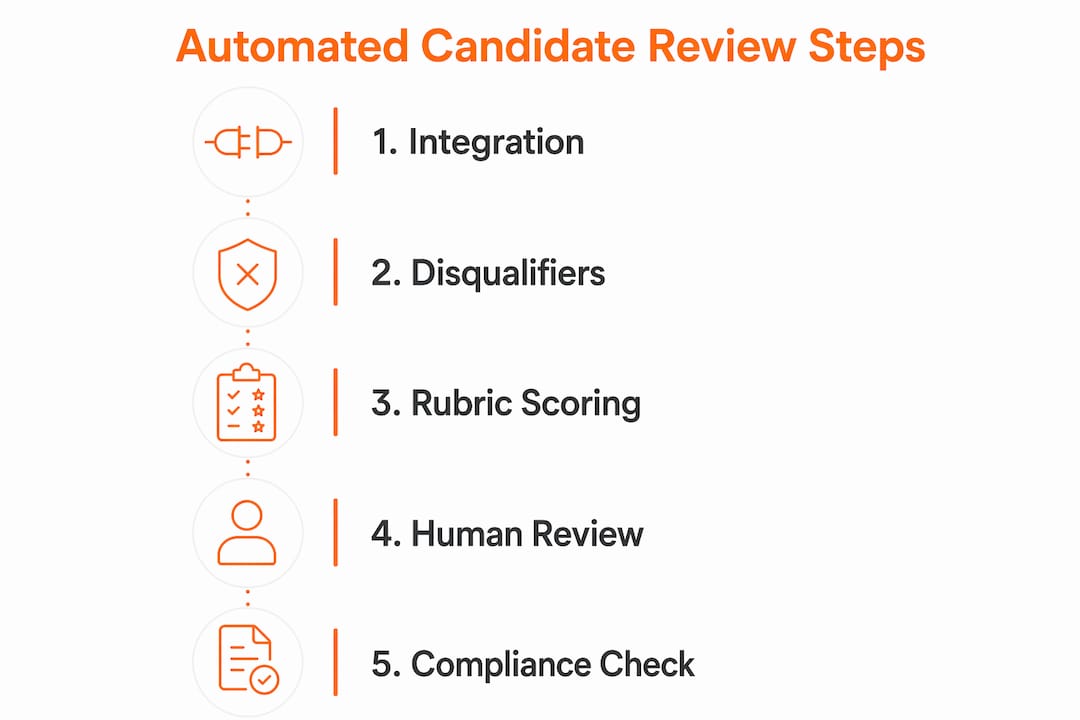
Weeks 1–2: ATS integration and data structuring. Connect your ATS to your screening tool via API. Map existing candidate fields to your rubric criteria. Audit historical applicant data to identify gaps. Define your three scoring tiers: qualified, borderline, and unqualified.
-
Weeks 3–4: Build and validate the scoring model. Configure your must-have filters first. Then layer in weighted rubric scoring for candidates who pass the binary filters. Test the model against a sample of 50–100 historical applications. Compare automated scores to the hiring decisions actually made. Adjust weights where the model diverges from known good hires.
-
Week 5: Run a 30-day parallel validation. This is the step most teams skip, and skipping it is a mistake. Run automated scoring alongside your existing manual review process simultaneously. A 91% agreement rate between AI scores and recruiter judgments is the benchmark for deployment readiness. If agreement falls below that threshold, revisit your rubric weights before going live.
-
Week 6: Phased deployment. Auto-advance candidates who score above your qualified threshold. Auto-reject candidates who fail must-have filters. Route borderline candidates to a structured human review queue. Do not automate the middle band. Structured human review of borderline candidates consistently improves hiring quality and reduces poor-hire risk.
-
Post-deployment: Automate scheduling and outreach. Once a candidate advances, trigger automated interview scheduling and confirmation emails. This is where you recover the most clock time per requisition.
-
Ongoing: Track metrics and iterate. Monitor pass rates by tier, time-to-advance, and offer acceptance rates. Adjust score thresholds quarterly based on outcome data.
Pro Tip: Start your automation with disqualifiers only. Get that layer working cleanly for two weeks before activating rubric scoring. Phasing in this order yields the best return and the least complexity.
| Phase | Timeline | Key action |
|---|---|---|
| Integration | Weeks 1–2 | Connect ATS, map fields, define tiers |
| Model build | Weeks 3–4 | Configure filters, set rubric weights |
| Parallel validation | Week 5 | Compare AI scores to manual decisions |
| Phased deployment | Week 6 | Auto-advance, auto-reject, human review for borderline |
| Iteration | Ongoing | Monitor metrics, adjust thresholds quarterly |
Common pitfalls when automating candidate evaluation
The biggest mistake teams make is trying to automate the entire hiring workflow at once. Phased automation starting with must-have filters consistently outperforms full-pipeline automation in both accuracy and recruiter adoption. Complexity compounds quickly when you skip the phased approach.
The second most damaging mistake is deploying a black-box AI model. When recruiters cannot see why a candidate received a specific score, they stop trusting the system. They override it manually, which defeats the purpose. Explainability is not optional. It is the feature that determines whether your team actually uses the tool.
Watch for these specific failure points:
- Ignoring the middle band. Borderline candidates are the highest-stakes group. Automating their rejection without human review produces the most errors and the most legal exposure.
- Skipping bias monitoring. Demographic pass rates must be tracked separately from scoring inputs. If one group passes at a significantly lower rate, the rubric needs review.
- No audit trail. Every automated decision must be logged. Without immutable records, you cannot defend a hiring decision in an EEOC investigation.
- Treating automation as a one-time setup. Rubrics drift. Job requirements change. An AI model calibrated in january may produce biased results by july if no one reviews it.
“Set-it-and-forget-it AI in hiring is not just ineffective. It can be unlawful. Active bias monitoring and regular audits are required to maintain Title VII compliance.”
Pro Tip: Create a monthly 30-minute audit ritual. Pull pass rates by demographic group, compare them to the prior month, and flag any shift greater than 5 percentage points for rubric review.
How do you keep automated hiring processes legally compliant?
Legal compliance in automated candidate evaluation rests on three pillars: recordkeeping, explainability, and active bias monitoring. Miss any one of them and your automation creates liability instead of reducing it.
Recordkeeping is the starting point. Federal regulations require retaining selection records for at least one year. For AI-driven screening decisions, the recommended retention period is three years. That means storing not just the final hiring decision but also the automated scores, the criteria applied, and the timestamp of every action.
Explainability connects directly to legal defensibility. Human-in-the-loop mechanisms where AI recommends and a recruiter authorizes advancement create a full audit trail. If a candidate challenges a rejection, you can show exactly which criteria they did not meet and at what score threshold.
“Monitoring demographic data separately from scoring inputs is the correct method. Feeding demographic data back into the AI model is both a legal risk and an ethical failure.”
Apply these compliance practices consistently:
- Never include protected attributes (race, gender, age, national origin) in scoring inputs.
- Enable human review on all automated rejections, at minimum through a sampling protocol.
- Log every automated decision with the criteria version used, not just the score.
- Conduct a formal bias audit at least twice per year.
- Review and update your scoring rubric whenever a job description changes significantly.
Compliance also improves candidate experience. Faster decisions and timely communication reduce candidate drop-off. When your automated process advances qualified candidates within 24 hours, you signal that your organization respects applicants’ time. That reputation compounds in competitive talent markets. For a deeper look at fair hiring steps, the principles of structured screening apply directly to automated workflows.
Key Takeaways
Automating candidate review works when you combine deterministic qualification filters, weighted rubric scoring, parallel validation, and human review for borderline cases.
| Point | Details |
|---|---|
| Build prerequisites first | Write qualification rules and a weighted rubric before configuring any automation tool. |
| Phase your rollout | Automate disqualifiers first, then add rubric scoring after two weeks of clean operation. |
| Validate before deploying | Run a parallel validation period and target 91% agreement between AI scores and recruiter judgments. |
| Keep humans in the loop | Route borderline candidates to structured human review; never automate the middle scoring band. |
| Audit actively and often | Monitor demographic pass rates monthly and conduct a formal bias audit at least twice per year. |
Why I think most teams automate candidate review in the wrong order
Most teams I have seen start with the flashiest part of automation: AI scoring. They configure a model, run it on live applicants, and then wonder why recruiters distrust the outputs within six weeks. The problem is not the AI. The problem is that the foundation was never built.
The correct order is unglamorous. You write the disqualifiers first. You get hiring manager sign-off on every filter. You run the binary rules for two weeks and watch what falls out. Only then do you add rubric scoring on top of a foundation that already works.
The other thing I have learned is that automation’s real value is not speed. It is focus. Reducing decision fatigue by surfacing only high-signal candidates means your recruiters spend their cognitive energy on the candidates who actually matter. A recruiter who reviews 12 well-screened candidates makes better decisions than one who reviews 80 unfiltered applications.
The recruiter is still the decision-maker. Automation does not change that. What it changes is the quality of the information the recruiter sees and the time they have to evaluate it. Build the system to serve the recruiter, not to replace them. That framing changes every design decision you make.
— Pavel
Testask makes automated candidate review practical
Recruiters who want to put these strategies into practice need a platform that handles scoring, collaboration, and compliance in one place.
Testask is an AI-powered recruitment assessment platform built for HR teams that need to evaluate candidates faster without sacrificing quality. It lets you create tailored test tasks, score submissions with AI-assisted analysis, and collaborate with hiring managers inside a single workflow. Every score comes with a plain-language explanation, so your team always knows why a candidate ranked where they did. Testask also maintains a full audit log of every assessment decision, which supports the recordkeeping requirements discussed throughout this guide. Explore Testask to see how it fits your current hiring process.
FAQ
What is automated candidate review?
Automated candidate review is the use of structured qualification rules and AI-assisted rubric scoring to filter and rank job applicants without manual triage. It reduces recruiter workload while keeping human decision authority intact.
How much time does automating resume screening actually save?
Automation saves recruiters 8–18 hours per requisition and reduces time-to-interview by up to 68%. The exact savings depend on application volume and how thoroughly the automation is configured.
What compliance rules apply to automated hiring processes?
Federal regulations require retaining selection records for at least one year. For AI-driven decisions, the recommended retention period is three years. Audit trails, explainable scoring, and regular bias monitoring are also required to maintain EEOC and Title VII compliance.
How do you avoid bias in automated candidate evaluation?
Track demographic pass rates separately from scoring inputs and conduct a formal bias audit at least twice per year. Never include protected attributes in scoring criteria, and enable human review on all automated rejections.
When should a human reviewer step in during automated screening?
Human review is required for all borderline candidates in the middle scoring band. It is also best practice to sample automated rejections regularly to verify the model is performing as intended.
Recommended
- Why Automate Screening: The HR Professional’s Guide | Testask Blog | testask
- What Is Automated Resume Screening? HR Guide 2026 | Testask Blog | testask
- Candidate Screening Process Guide: Streamlined Hiring Steps | Testask Blog | testask
- Candidate Feedback Process: Best Practices for 2026 | Testask Blog | testask